

Hey there! As a supplier of 800G OSFP DR8+ products, I'm super excited to share with you how to monitor the status of these awesome devices.
First off, let's quickly understand what 800G OSFP DR8+ is. The 800G OSFP DR8+ is a high - speed optical transceiver that plays a crucial role in modern data centers and high - speed networks. It offers a data rate of up to 800 gigabits per second, which is just mind - blowing. If you want to know more about this kind of high - tech stuff, you can check out these links: Optical Module 800G, High Speed Optical Transceiver, and 800g Optical Transceiver.
Why Monitor the Status of 800G OSFP DR8+?
Monitoring the status of 800G OSFP DR8+ is not just a fancy thing to do. It's actually super important for several reasons.
Ensuring Reliability
In a data center, every single component needs to work flawlessly. The 800G OSFP DR8+ is no exception. By monitoring its status, we can detect any potential issues early on, like overheating or a drop in signal strength. This way, we can prevent system failures and keep the network running smoothly.
Optimizing Performance
Monitoring helps us understand how the transceiver is performing under different conditions. We can adjust settings to optimize its performance, such as tweaking the transmit power or the receive sensitivity. This leads to better overall network performance and higher data transfer speeds.
Cost - Efficiency
Detecting problems early can save a lot of money in the long run. Instead of waiting for a complete failure and having to replace the entire module, we can fix minor issues before they become major headaches. This reduces downtime and the cost of maintenance.
How to Monitor the Status
Temperature Monitoring
One of the key parameters to monitor is the temperature of the 800G OSFP DR8+. High temperatures can significantly affect the performance and lifespan of the transceiver. Most 800G OSFP DR8+ modules come with built - in temperature sensors.

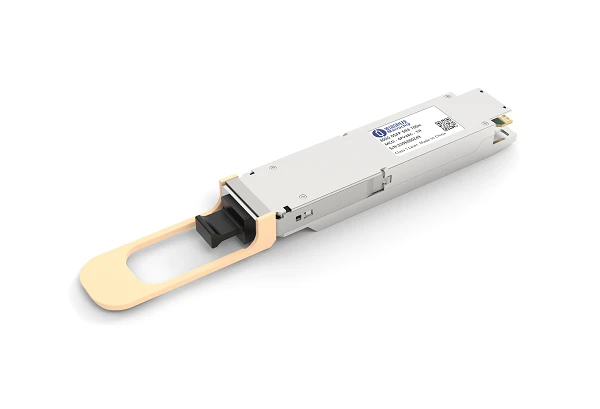
You can use a network management system (NMS) to access the temperature data. The NMS will give you real - time information about the temperature of the module. If the temperature exceeds the recommended range, it's a sign that there might be a cooling issue or that the module is overloaded.
For example, if you notice that the temperature is consistently above 70°C, you might need to check the ventilation in the data center or reduce the workload on the module.
Optical Power Monitoring
Another important aspect is the optical power. The transmit optical power and the receive optical power are two critical values.
The transmit optical power indicates how strong the signal is being sent out from the module. If the transmit power is too low, the signal might not reach the destination properly. On the other hand, if it's too high, it can cause interference.
The receive optical power shows how well the module is receiving the incoming signal. A low receive power might mean that there is a problem with the fiber connection or that the signal has degraded over a long distance.
You can use an optical power meter to measure these values. Many modern NMSs also have the capability to read the optical power data directly from the module.
Diagnostic Monitoring
Most 800G OSFP DR8+ modules support digital diagnostic monitoring (DDM). DDM provides a wealth of information about the module, including temperature, voltage, bias current, and optical power.
You can use a DDM - enabled NMS or a specialized DDM reader to access this data. The DDM data is usually presented in a user - friendly format, making it easy to understand and analyze.
For instance, if the bias current is abnormal, it could indicate a problem with the laser diode in the module. By regularly checking the DDM data, you can catch these issues before they cause a major problem.
Link Status Monitoring
Monitoring the link status is also crucial. You can use the NMS to check if the link between the 800G OSFP DR8+ module and the network device is up or down.
If the link is down, it could be due to a variety of reasons, such as a broken fiber, a misconfigured port, or a problem with the module itself. By quickly identifying the cause of the link failure, you can take appropriate action to restore the connection.
Best Practices for Monitoring
Regular Checks
Set up a regular monitoring schedule. Check the status of the 800G OSFP DR8+ modules at least once a day. This way, you can catch any issues early and prevent them from escalating.
Keep Records
Maintain a record of all the monitoring data. This will help you track the performance of the modules over time and identify any trends. For example, if you notice that the temperature is gradually increasing over a few weeks, it could be a sign of a long - term cooling problem.
Training Staff
Make sure that your staff is trained to use the monitoring tools effectively. They should know how to interpret the data and take appropriate action when they detect an issue.
Conclusion
Monitoring the status of 800G OSFP DR8+ is essential for ensuring the reliability, performance, and cost - efficiency of your network. By monitoring temperature, optical power, using diagnostic monitoring, and checking the link status, you can keep your 800G OSFP DR8+ modules in top - notch condition.
If you're interested in purchasing 800G OSFP DR8+ modules or have any questions about monitoring them, feel free to reach out to us. We're here to help you make the most of these high - speed optical transceivers.
References
- Industry standards for 800G optical transceivers
- Documentation provided by transceiver manufacturers
- Research papers on high - speed network monitoring